The lap you
ran, read back
to you.
Records every lap — from the phone you already carry, or a supported Bluetooth GPS receiver — then replays it on the map with speed, G and delta.
 Download on theApp Store
To follow onGoogle Play
Download on theApp Store
To follow onGoogle Play
- Circuits
- 181 built-in + custom
- GPS source
- Phone or Bluetooth LE
- Storage
- On-device only
A lap time says what.
This says where.
Every timing app gives you a number. It arrives after the fact, and it never says which corner produced it.
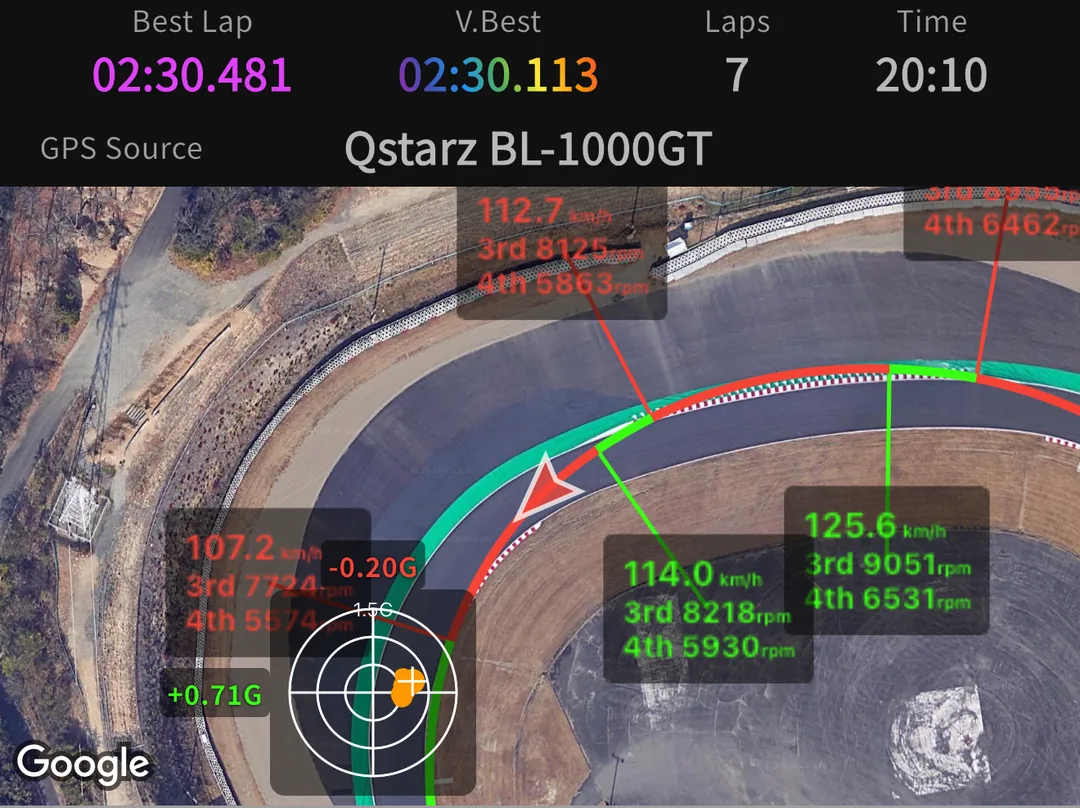
Pole Lap Logger keeps the whole lap — position, speed, longitudinal and lateral G, every line crossing — and hands it back as a racing line coloured by what you were doing, a speed trace, and a delta.
So the question stops being how fast the lap was, and becomes where the tenth went: the entry, the mid-corner, or the exit.
Built for a glance,
not a stare.
Set everything before you head out; on track the screen only needs a glance. Big, high-contrast numerals. Sector splits land the instant you cross the line — green for your session best, purple for your personal circuit best across every session saved on the device.
The live delta runs against whichever benchmark you chose — your all-time best, or a specific target session you pinned before heading out. In- and out-laps are detected and excluded, so the laps either side of a stop never pollute your times; where the built-in layout carries pit lines, they catch a mid-session return as well.
- What it records
- Lap, sector and split times · position · speed · longitudinal and lateral G.
- Sector timing
- As many sector lines as the layout needs, split on crossing.
- Live delta
- Continuously updated against the benchmark you selected.
- Pit aware
- In- and out-laps are kept out of your best times; most built-in layouts carry pit lines too.
- Resilient
- Survives screen-off, backgrounding and a brief receiver dropout.
Two laps, one map,
one honest answer.
Choose a lap and a lap to chase. The first is your base, the second the reference, and every delta on the page is read from your point of view — negative means you are ahead.
- Coloured line
- Green under power, red under brakes — painted onto the satellite map at every sample. MAP
- Speed & G
- Speed, longitudinal and lateral G on a shared axis; switch the X axis between time and distance. GRAPH
- Rev & gear
- Enter the gear ratios, final drive and rev limit once, and the trace shows the gear and rpm you were actually in. VEHICLE
- Replay camera
- Flat 2D, or a chase camera that tilts and leans into the corner as the lap plays. PLAYBACK
Draw the lines
yourself.
181 official layouts ship with the app. Everything else is yours to build: place the start/finish line on the satellite view, then add sector lines wherever the corners suggest.
Split start and finish lines are supported, so a hillclimb or a point-to-point stage times correctly. Pit lines are not something you draw — they arrive already placed on most built-in layouts, so a circuit of your own is start/finish and sectors. Save the layout once and it behaves exactly like a built-in circuit — including best times, sector ranking and the purple personal circuit best.
See the built-in list→Every line is a segment you drag across the track. Crossing it is what starts, splits or ends a lap.
The rest of it.
GPX · CSV · NMEA export
Write a session out in the format your other tools already read — the whole track, not a summary.
Target session
Pin one session as the benchmark and chase that, instead of an all-time ghost set in better conditions.
Landscape split
Lay the phone down and the layout splits left/right in the direction you physically turned it.
Open-with import
A session file shared by a friend opens straight into your history from the share sheet.
Background recording
The session keeps running with the screen off and the app in the background.
English & 日本語
Switchable independently of the phone’s own language.
Start with the
phone you have.
Nothing to buy before your first session: the app records from the phone’s own GPS. When you want the numbers sharper, it speaks each supported receiver’s native Bluetooth LE protocol directly — no adapter, no desktop step, no proprietary dongle.
- Nothing is uploaded
- Sessions, laps and track points live in the app’s database on your phone.
- No account, ever
- There is nothing to sign up for, because there is no server of ours to sign into.
- Yours to take
- Nothing locks your sessions in. Export them in full — leaving is always possible.
- No ads, no tracking
- The app is paid for by the people who use it — never by selling your attention or your data. Anonymous usage measurement is opt-in, and stays off until you say yes.
Two ways to record
- Phone GPS
- Position about once a second. Laps, sectors, the line and the delta all work; expect a lap time to sit within about a tenth to three tenths of a second of what a logger would have read.
- Bluetooth LE receiver
- Position ten to twenty-five times a second. A finer line, tighter sector splits, and a delta that answers the moment you lift.
Supported receivers · all Bluetooth LE
- RaceBox Mini / Mini S / Micro
- Native binary
- Qstarz BL-1000GT
- Native binary
- Columbus P-9 Race
- NMEA 0183
- DigSpice III
- Native binary
181 layouts,
ready to run.
Every built-in layout arrives with its start/finish line already placed, and nearly all of them with sector and pit lines too. The list keeps growing. Anything not listed you draw in a few minutes — and it works identically.
Full circuit list→Built in, ready to run
Circuit de Spa-Francorchamps
—
Autodromo Nazionale Monza
—
Silverstone
Grand Prix (International Pits) · Grand Prix (National Pits) · International · National · Stowe Circuit
Suzuka Circuit
East · International Racing · South Course
Le Mans
24 Hours (3 sectors) · 24 Hours (9 zones) · Bugatti · Indy-Kart Circuit · Karting Alain Prost Circuit · Karting International Circuit
Red Bull Ring
Full · Kart Track · South
Autódromo José Carlos Pace
Interlagos (Kartódromo Ayrton Senna) · Interlagos (Racing Track)
Free to run.
Paid to keep.
Recording and analysis are never limited. Premium removes the cap on how many sessions you keep on the device. Today that cap is its only effect; features added in future updates may be part of Premium.
- Full recording & analysis
- Keep up to 2 sessions
- All circuits, including your own
- GPX · CSV · NMEA export
- No ads, ever
- Unlimited saved sessions
- Cancel any time
- Unlimited saved sessions
- Restores on the store you bought it from
On the way
Two things are being built. Neither has a date, and whether they end up in Premium or in the free version is not settled yet.
- Laying a recorded lap over in-car video.
- Apple CarPlay and Android Auto support.
Prices vary by storefront. The USD and JPY prices above are reference prices; your store displays the price that applies to you. A purchase stays with the store you bought it from — it restores on that store account, and does not transfer between iOS and Android.
Contents.
Go and find
the tenth.
Your first session needs nothing you do not already own — the phone is enough to start. Pole Lap Logger is on the App Store — iOS first, Android to follow.
Download on theApp Store
To follow onGoogle Play